AI live translation

AI live translation from Bit Creative: Lacuna Live, the multilingual captioning system we built, backed by our on-site technical team. Your audience opens a web page, picks a language, and follows every word as it’s spoken.

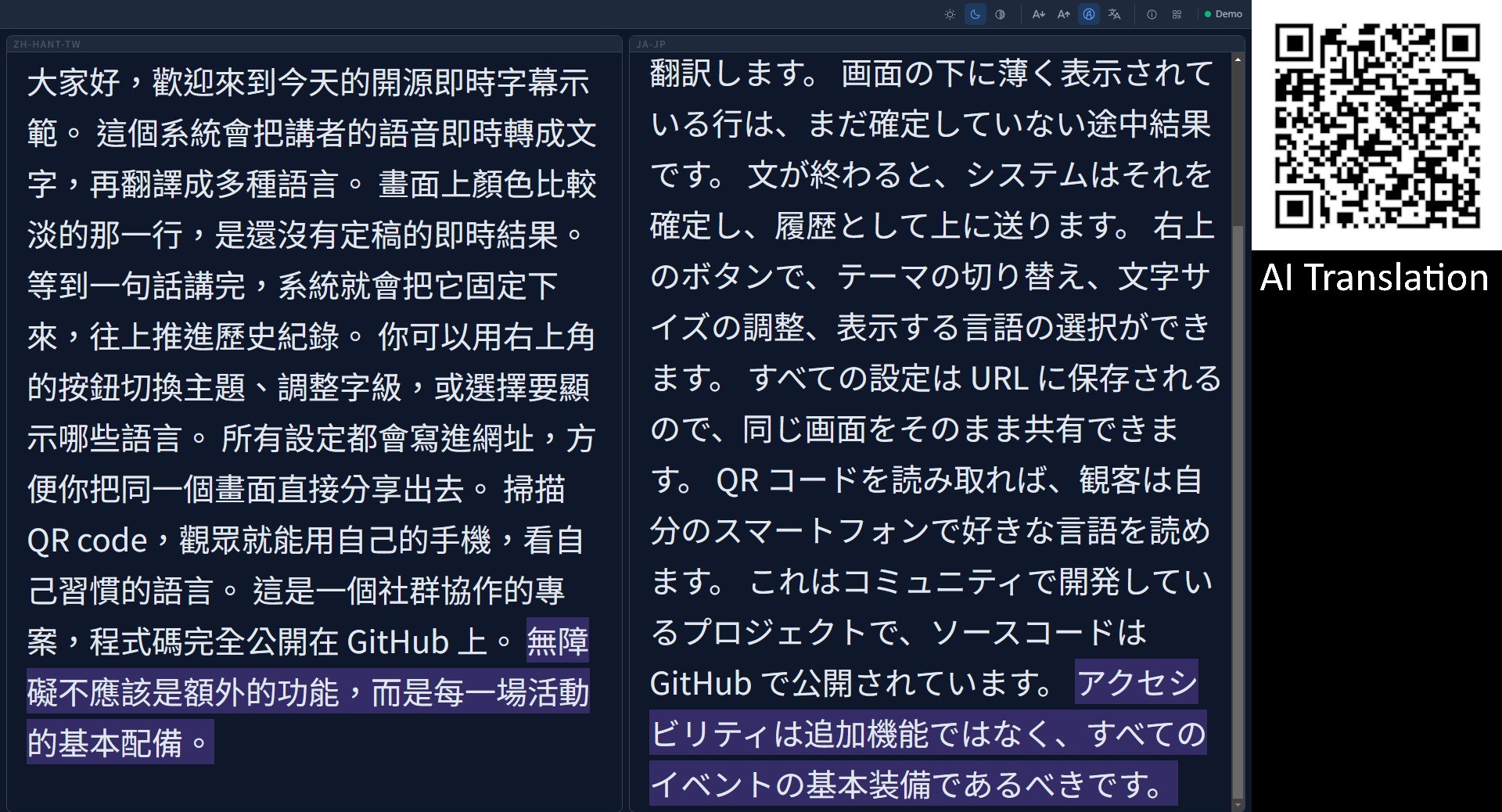
Live multilingual captions on screen at an event, by Bit Creative

Whether AI captions work comes down to what happens on the day. We build and run Lacuna Live, so the people who wrote the system are the ones in the room, and when something goes wrong we fix it at the source.

We give event organizers an end-to-end live captioning service: we capture audio from a single source, transcribe it, translate it into multiple languages, and deliver the captions simultaneously to the audience in the room, viewers online, and your streaming platform.

Our captioning system, Lacuna Live, is built and operated by Bit Creative. Organizers can sign up and run it themselves, paying only for what they use. It grew out of OpenTransLive, an open-source project led by SeanGau in the g0v community.

Anyone can switch on a tool. What makes captions actually usable is knowing how to patch in the audio feed, handle speakers’ accents, teach the system your terminology, and stay up when the network drops.
Where it fits

International conferences and forums

Speakers present in Chinese or English to an international audience, and every attendee needs captions in their own language.

Public hearings and briefings

Public-interest meetings need a live verbatim record and accessible captions, plus an official record you can export afterward.

Hackathons and community meetups

Participants come from many countries, the agenda is packed and speakers change fast, so the captioning setup has to switch just as quickly.

Online courses and livestreams

Captions stay in sync with your YouTube livestream, and viewers pick their own language on their phones.

Lacuna LiveSelf-serve online

Smaller events don’t always need a technician on site. Sign in to Lacuna Live, create a session, choose your languages in the browser, and hit start. Your audience scans a QR code and reads captions on their phones. Nothing to install, viewing is always free, and organizers pay only for the audio actually captured, in credits, with no monthly fee.

Go to Lacuna Live

Service plans

To run it yourself, sign up on Lacuna Live. If you need people behind it, Bit Creative offers the three options below, matched to your team and venue. All of them are quoted and contracted directly with Bit Creative, not purchased through Lacuna Live. Scope can be adjusted to the size of your event.

On-site full service

We bring the equipment on the day, run captions on Lacuna Live, and keep a technician on site from audio capture to caption display.

  • Site visit and audio feed planning beforehand
  • Audio capture equipment, caption control computer, and backup internet
  • Custom glossary and speaker setup before the event
  • Technician on site throughout for monitoring and live corrections
  • Transcript delivered after the event
Request a quote

Remote support

You handle the audio on site; we set up the session on Lacuna Live remotely and monitor caption quality throughout.

  • Online test run and audio source check beforehand
  • Caption session set up and run by us
  • Remote monitoring and recognition tuning during the event
  • Audience caption page and QR code
  • Transcript delivered after the event
Request a quote

Self-hosting consulting

For organizations that want to run it long-term on their own servers, the original developers help deploy the open-source OpenTransLive and train your staff.

  • System architecture planning and hosting recommendations
  • Open-source deployment with Docker Compose and go-live support
  • Speech engine selection (WhisperX, OpenAI, Groq, ElevenLabs, Google Speech-to-Text) and cost estimates
  • Training for your in-house operators
  • Ongoing technical point of contact after rollout
Request a quote

Key features

Recognizes 40+ languages

Live transcription runs on Gemini Live or ElevenLabs Scribe, covering more than 40 languages, including Mandarin, Cantonese, English, Japanese, Korean, and Southeast Asian and European languages.

Context-aware translation

Translation takes the surrounding captions into account, so names, terms, and pronouns read more like a human interpreter’s. Choose a formal, natural, conversational, or literal tone.

No sign-up, no audience cap

Viewers just open a web page and pick a language. No app to download, no login, and no limit on audience size.

Custom glossary

Load speaker names, organization names, and industry terms before the event to dramatically cut recognition errors on key words.

YouTube livestream integration

Captions sync with the livestream timeline, so online viewers and the audience in the room see the same thing.

Edit and export captions

Edit or delete any caption line on the fly and every language updates with it. Afterward, export a JSON record and SRT subtitle files.

Why Bit Creative

We built it

We develop and operate Lacuna Live. If recognition or translation misbehaves on site, we can pinpoint the cause and fix it ourselves instead of waiting on a vendor.

Livestream experience

Bit Creative also produces event livestreams and multi-camera broadcasts. We know audio feeds, switchers, and network backup, so captions slot into your existing production workflow.

Self-serve or fully managed

Smaller events can sign up on Lacuna Live and pay as they go. For on-site or remote support, contact Bit Creative directly. To run it long-term on your own servers, we can help you self-host the open-source OpenTransLive.

Frequently asked questions

How far ahead should we start?

Get in touch at least two weeks before your event so we can schedule a site visit, audio tests, and build your custom glossary. On a tighter timeline? Email us with the details and we’ll tell you what’s feasible.

Can we run it ourselves without you?

Yes. Sign in to Lacuna Live (https://lacunalive.com/) and activate live transcription, then start caption sessions right in your browser, with nothing to install. Viewing is always free; organizers pay only for the audio actually captured, in credits, with no monthly fee. Online credit purchases are coming soon. Until then, sign in and email us to get activated.

Which languages are supported?

Speech recognition covers more than 40 languages, including Mandarin, Cantonese, English, Japanese, Korean, Southeast Asian languages, and most European languages. Translation languages can be added or removed freely in the control panel.

What if the venue’s internet is unreliable?

Our on-site full service plan brings its own mobile internet backup. We also check network quality during the site visit and adjust our choice of speech engine if needed.

How is Lacuna Live related to Bit Creative?

Lacuna Live is an AI live translation and captioning SaaS developed by Bit Creative (Bit Creative Co., Ltd., Taipei). It grew out of OpenTransLive, an open-source project Bit Creative leads in the g0v community. To run it yourself, sign up and buy usage directly on Lacuna Live. Staffed services, including on-site operation, remote support, and self-hosting consulting, are provided by Bit Creative: email sean@bitcreative.cc for a quote. These are not sold through the Lacuna Live platform.

Will captions replace professional interpreters?

No. Live captions are about lowering language barriers and widening access. They suit events where budget or venue constraints rule out simultaneous interpretation, and they can also run alongside human interpreters.

Ready to host an event without language barriers?

Email us your event’s date, venue, size, and the languages you need, and we’ll get back to you with a recommended plan and quote.

Email us